


You’re in your workshop running a 45-minute milling job. Instead of standing there watching the machine, you’d like to work on your CAD design at your desk, prep the next job, or just grab lunch. But what if something goes wrong? The spindle could fault, air pressure could drop, or a sensor could trigger. By the time you hear the problem or come back to check, the damage is already done—broken tool, ruined workpiece, or worse.
This is exactly what MachPro’s Global Monitoring System solves. MachPro actively monitors machine conditions, responds to events in real-time, and prevents problems before they cause costly damage… with NO CODE. Additionally, the Global Monitoring System enables you to customize your machine and do advanced features with just simple setup.
Think of it as giving your CNC machine a brain that watches for trouble or responds to the real word and takes action automatically—so you can run your machine your way.
Let’s explore five practical applications that demonstrate how this system solves real shop floor challenges.
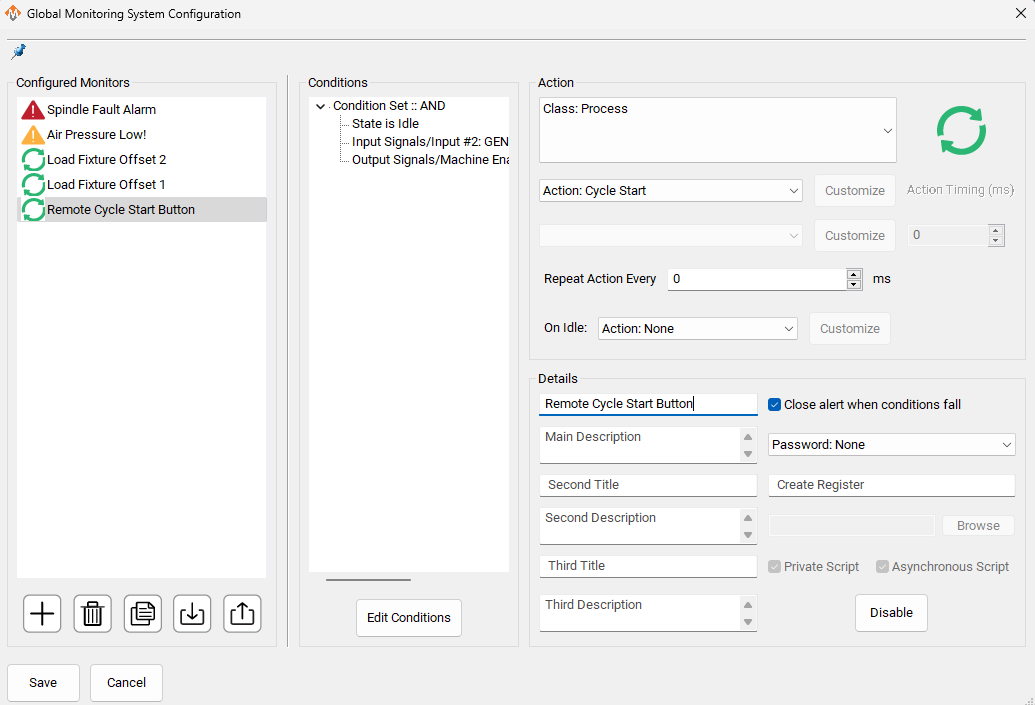
Application 1: Remote Cycle Start Button
The Problem: You waste time walking back and forth to the CNC control or just want a simple way to start your machine without the cost of a full operator panel.
The Solution: Configure any machine input as a remote cycle start trigger. Place ergonomically positioned buttons exactly where you need them—near loading stations or integrated into fixtures.
How It Works: Wire a simple pushbutton to an available input. The Global Monitoring System watches that input and triggers cycle start when pressed—but only when it’s safe. The system checks that the machine is enabled and idle before allowing the start command, preventing accidental activation.
Application 2: Spindle Drive Fault Detection
The Problem: VFDs and spindle drives can fault due to overcurrent, overtemperature, or other errors. During unattended operation, the spindle stops while the machine keeps moving—destroying tools, damaging workpieces, or worse.
The Solution: Monitor the fault output from your spindle drive. When a fault occurs, the Global Monitoring System immediately stops motion and disables the machine before damage happens.
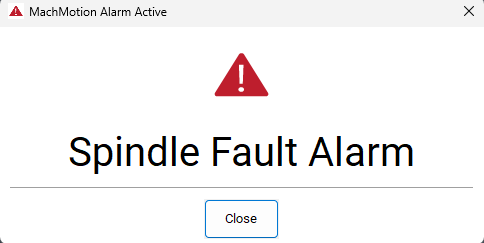
How It Works: Most modern drives provide a fault relay or digital signal. Connect this to a machine input, then create a monitor that watches for the fault condition. When triggered, the system can stop motion, display a detailed error message explaining what happened, and require operator acknowledgment before resuming.
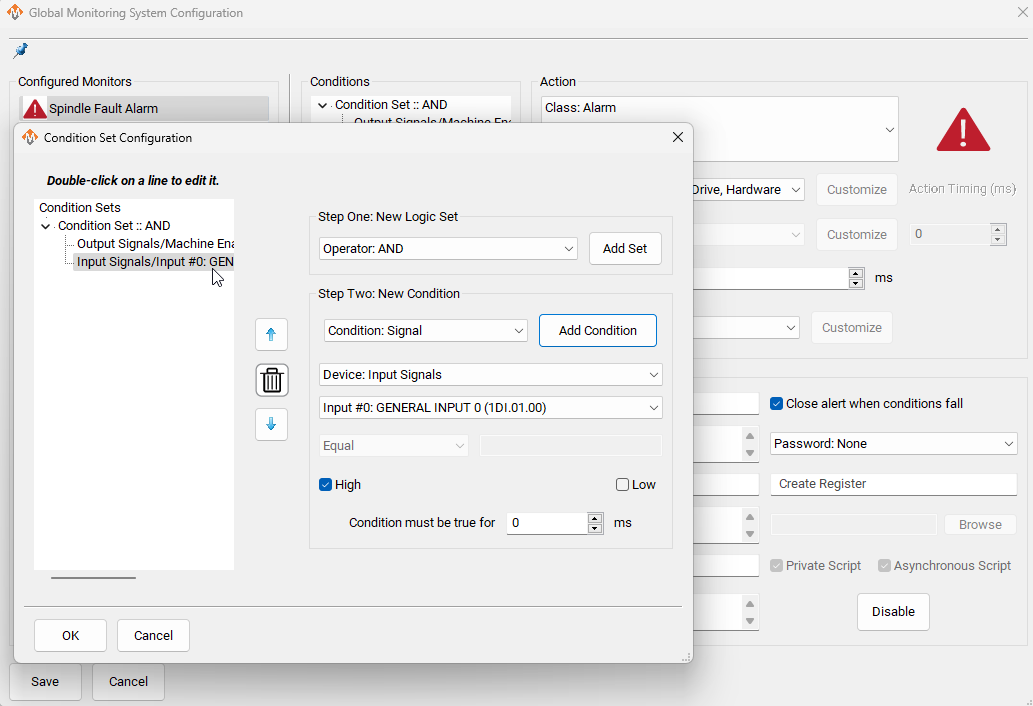
You can even create tiered warnings—alerting operators when spindle current reaches 90% of capacity (potential problem brewing) before escalating to a full alarm if ignored.
When you have an alarm, it will display the alarm and any details you added to it.
Application 3: Low Air Pressure Alarm
The Problem: CNC machines depend on pneumatics for tool clamping, drawbars, and part holding. When shop air pressure drops silently due to compressor failure or leaks, tools don’t clamp properly and machine functions like tool changes fail. The result? Scrapped parts, damaged tools, dangerous situations.
The Solution: Monitor pneumatic pressure using switches or analog sensors. The system alerts operators to low pressure and prevents machine operation until pressure returns to safe levels.
How It Works: Install a pressure switch in your air line. Create a warning monitor that prevents cycle start when pressure drops. For critical protection, add a second switch at 50 PSI that stops and disables the machine immediately.
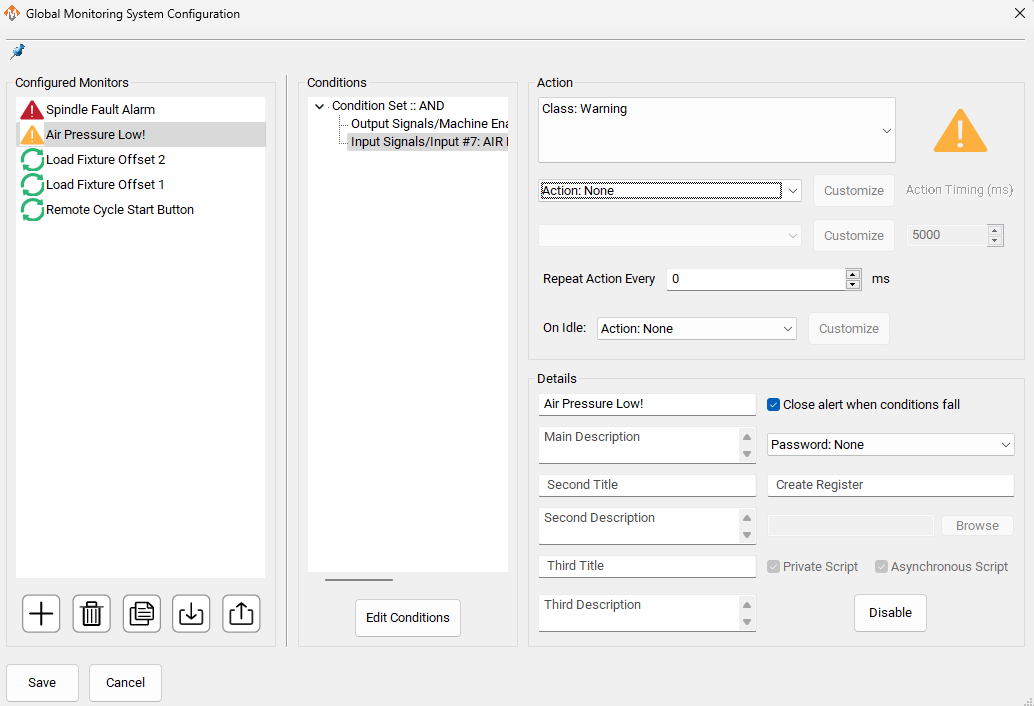
If you try to press Cycle Start with a warning active, you will get a message from the top of the screen saying to Clear all Alarms and Warnings.

Application 4: Trend Monitoring and Diagnostics
The Problem: Intermittent issues are the hardest to diagnose. Your spindle faults occasionally. Air pressure seems to dip sometimes. A limit switch triggers randomly. But when you investigate, everything looks fine. Without data showing when and how often these events occur, you’re left guessing whether there’s a real problem or just normal operation.
The Solution: Use the Global Monitoring System to track patterns and trends over time. See exactly when faults occurred, how frequently problems happen, and correlate events to identify root causes before they become serious failures.
How It Works: All alarms are automatically tracked in the Global Monitoring System. The diagnostics window shows you a complete history: tracking warnings, alarms, and other items. With the built in logging database in the backend of MachPro, you never have to worry about losing your history after cycling the power of your machine.
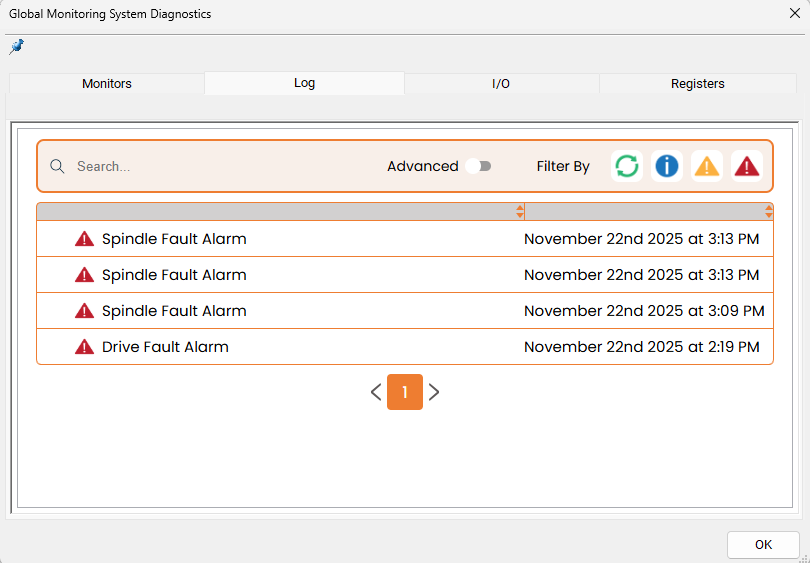
For example, tracking spindle fault frequency might reveal it happens every Tuesday afternoon—right when the neighboring shop fires up their welder, causing voltage sags. Or monitoring air pressure could show it drops during lunch when everyone runs air tools simultaneously. These patterns are invisible without data but obvious once tracked
Application 5: Automated Fixture Selection
The Problem: Running multiple part families on one machine means different fixtures, work offsets, and programs. Manually selecting the correct setup for each job creates opportunities for error. Loading Part A into Fixture B with wrong offsets means scrapped parts or crashed tools—especially common during shift changes or when running unfamiliar parts.
The Solution: Use selector switches to identify which fixture is installed. The system automatically selects the appropriate work offset, eliminating manual selection errors.
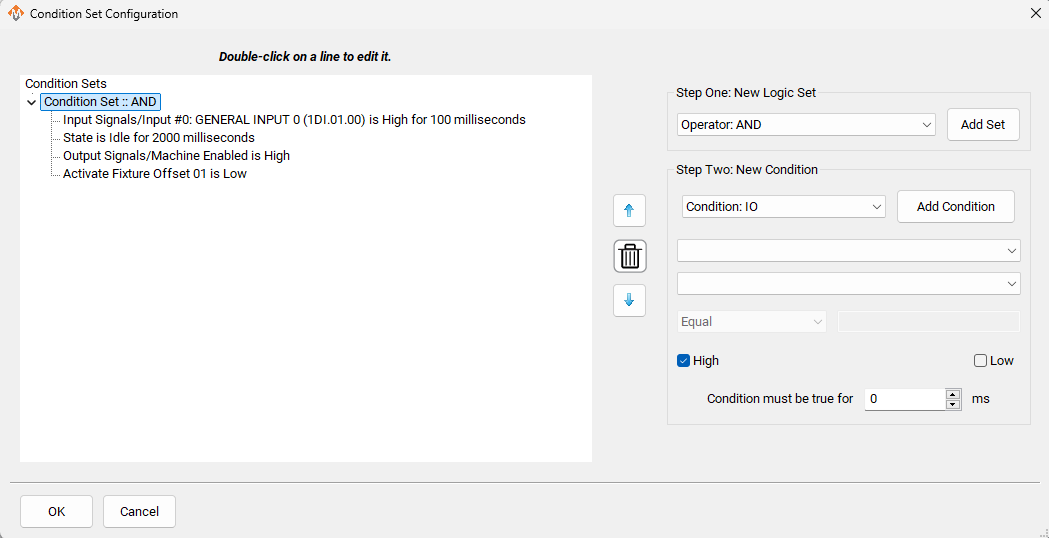
How It Works: Install a simple switch with positions for each fixture configuration. When you select a specific fixture, MachPro automatically applies the G54 work offset. No manual offset selection, no mistakes. Although there are more conditions to define, it is still a no code setup process as shown below.
Beyond These Five Applications
These applications demonstrate the system’s versatility, but they’re just the beginning. The Global Monitoring System can:
- Monitor any combination of inputs, outputs, machine states, and register values
- Respond with actions ranging from silent automation to emergency shutdown
- Track and log data for historical analysis and predictive maintenance
- Monitor multiple machines from a central location for shop-wide visibility
And more.
Getting Started
Start simple. Pick one critical application—maybe spindle fault monitoring or air pressure alarms—and implement it first. Master the basics before expanding to more sophisticated applications.
The system includes a visual diagnostics window that shows exactly what each monitor is watching and why it did or didn’t trigger. This makes troubleshooting straightforward and helps you refine your monitoring strategies over time.
When you install MachPro, it comes with preconfigured monitors for your machine type. You can easily customize those for your specific needs.
Learn more about Global Messaging here: https://support.machmotion.com/books/software/page/global-monitoring-system
The Bottom Line
The Global Monitoring System transforms MachPro into an intelligent manufacturing system. It prevents damage, reduces downtime, improves efficiency, and enables sophisticated configurations that weren’t previously possible… and all with NO CODE.
Everything in MachPro was designed to simplify your process and give you the freedom to create your way.
Ready to implement the Global Monitoring System on your machine? Request a free demo of MachPro today!
